
Standing
Admins keep permanent access “just in case”. Every such account is an open door for as long as it exists, whether or not anyone needs it.
IT OPERATIONS
Unified360IT operations & observability platformNetwork TopologyAuto-discovered mapsLink UtilizationBandwidth and link qualityBusiness Service ManagementApplications, services and impactIPAMSubnets, IPs and conflictsAlerting & EscalationDetect, notify, recoverSERVICE & ASSETS
ITDeskIT service management platformIncidents & SLAsOne desk for every requestIntelliAssetIT asset & patch managementPatch ManagementDetect, deploy, roll backISMS Audit PackISO 27001 evidence, readyBY CHALLENGE
Blind Spots in InfrastructureNo extra tools: hardware to URLs on one screenSlow Ticket ResolutionRoute, watch and escalate to fix fasterUnknown Assets & Unpatched SystemsKnow what you own, patch what's exposedUncontrolled Privileged AccessVault, approve, record and auditManual, Repetitive OperationsAutomate approvals and remediationAudit & Compliance PressureEvidence on demandBY STACK
Networks & WirelessSwitches, firewalls and controllersServers & DatabasesWindows, Linux and leading databasesVirtual & Hybrid EstatesHypervisors and hybrid workloadsEndpoints & DevicesAgent-based inventory and updatesRemote & Privileged SessionsAgentless SSH, RDP and VNCTools & IntegrationsITSM, SIEM, webhooks and emailLEARN
Quick Start GuidesSoonGet productive with any Autointelli product in minutes.Product DocumentationAdmin manuals, how-tos and API references.Integration CatalogSoonWhat Autointelli connects to, and how.IT Terms ExplainedPlain-language definitions of everyday IT jargon.DISCOVER
Customer StoriesHow organisations get measurable results.WhitepapersResearch on IT operations, ITSM, ITAM and PAM.Ebooks & PlaybooksPractical, step-by-step operating guides.Product DatasheetsCapabilities and technical specifications.Why AutointelliHow we differ from other platforms.Compare AutointelliSide-by-side with tools you may be weighing.Solution · By Challenge
Standing admin rights, shared passwords and sessions nobody recorded are how a small mistake becomes a breach. Securita360 vaults every credential, opens access only when it is approved, and records what happens, so privilege is temporary, controlled and provable.
The problem
The most powerful accounts in your estate are often the least controlled.
Admins keep permanent access “just in case”. Every such account is an open door for as long as it exists, whether or not anyone needs it.
Root and service passwords live in spreadsheets, chat threads and people's heads. They are copied freely and rarely changed.
When something breaks or leaks, nobody can say who logged in, why they did, and what they did once inside.
How privilege goes wrong
How it goes wrongRoot and service passwords live in spreadsheets, chat threads and memory. They are copied freely and rarely changed.
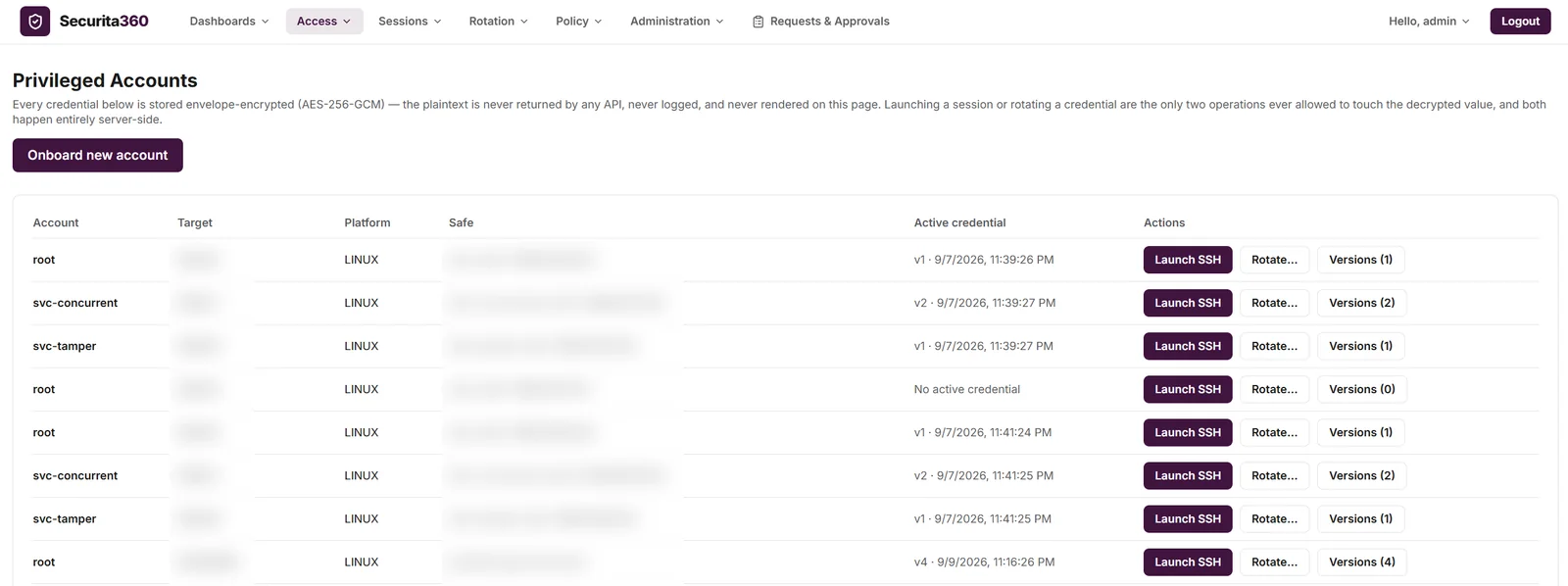
Closed withAn envelope-encrypted vault (AES-256-GCM). The plaintext is never returned by an API, logged or shown. Safes, versioned credentials, and dual control on the safes that need it.
How it goes wrongStanding rights kept “just in case”. The door stays open whether or not anyone needs to walk through it.
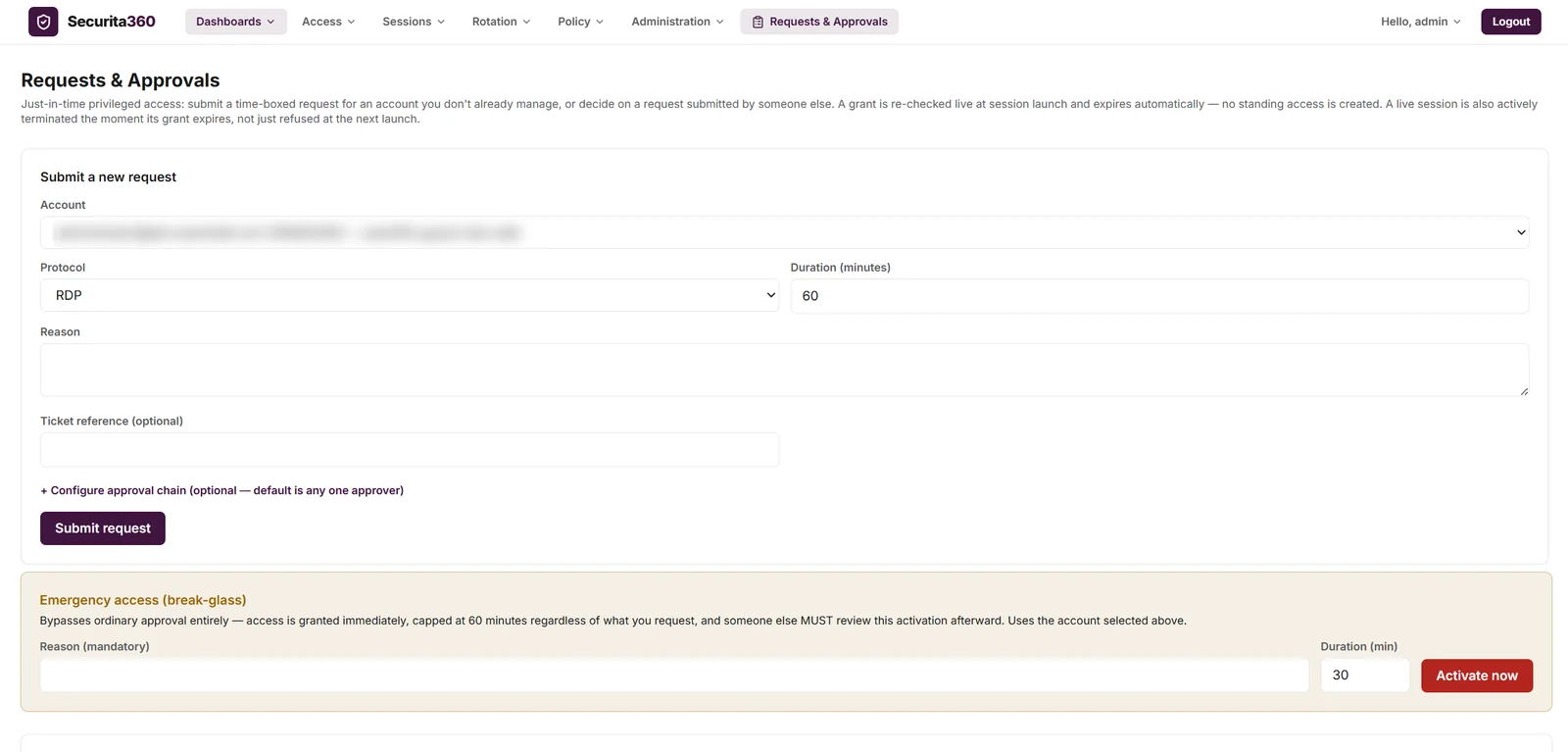
Closed withTime-boxed requests with a reason and an optional ticket reference, approval chains, auto-expiry checked again at launch, and live sessions ended when a grant expires or is revoked.
How it goes wrongThe same shared password for years, because changing it means breaking something.
Closed withOn-demand rotation: change on the target, verify the new password works, then commit it to the vault, with a history of every attempt. Linux and Unix over SSH today.
How it goes wrongOnce someone has seen a password they can keep it, paste it and share it.
Closed withBrowser-based SSH and RDP sessions. The gateway injects the credential server-side, so there is nothing to install on the target and no password for the user to copy.
How it goes wrongOne typo or one bad intention on a production server, and nothing stops it.
Closed withA command policy for SSH sessions that allows, warns on, denies or terminates by rule, records every command, and alerts your webhook, email or SIEM.
How it goes wrongWhen something breaks or leaks, nobody can say who logged in, why, or what they did.
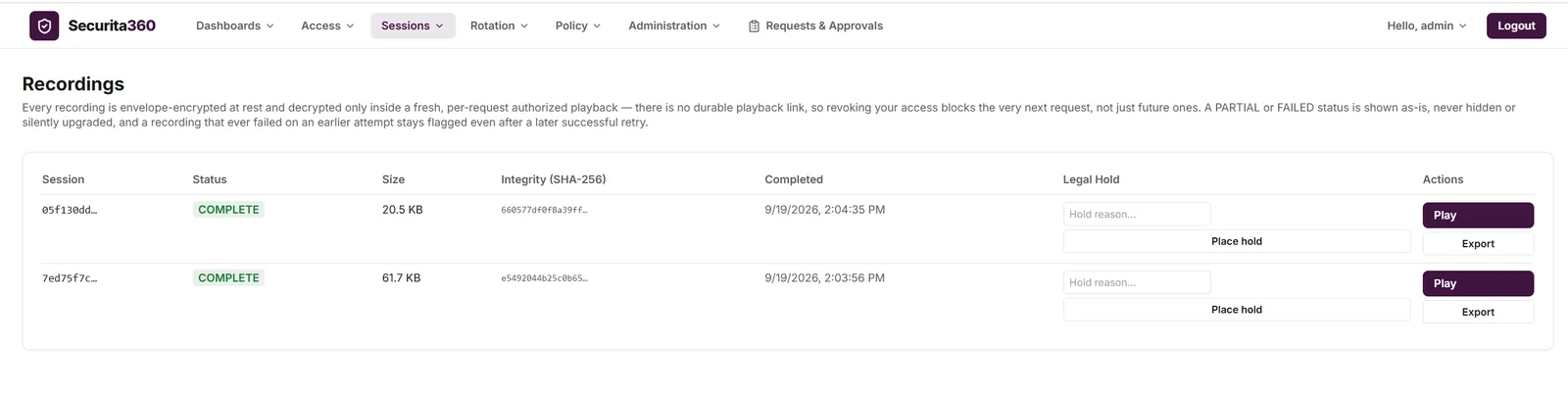
Closed withEncrypted session recordings with playback behind a fresh authorization, and a hash-chained audit trail exported to your SIEM in CEF format.
How Securita360 closes them
Four steps on one platform, from the person asking for access to the evidence of what they did with it.
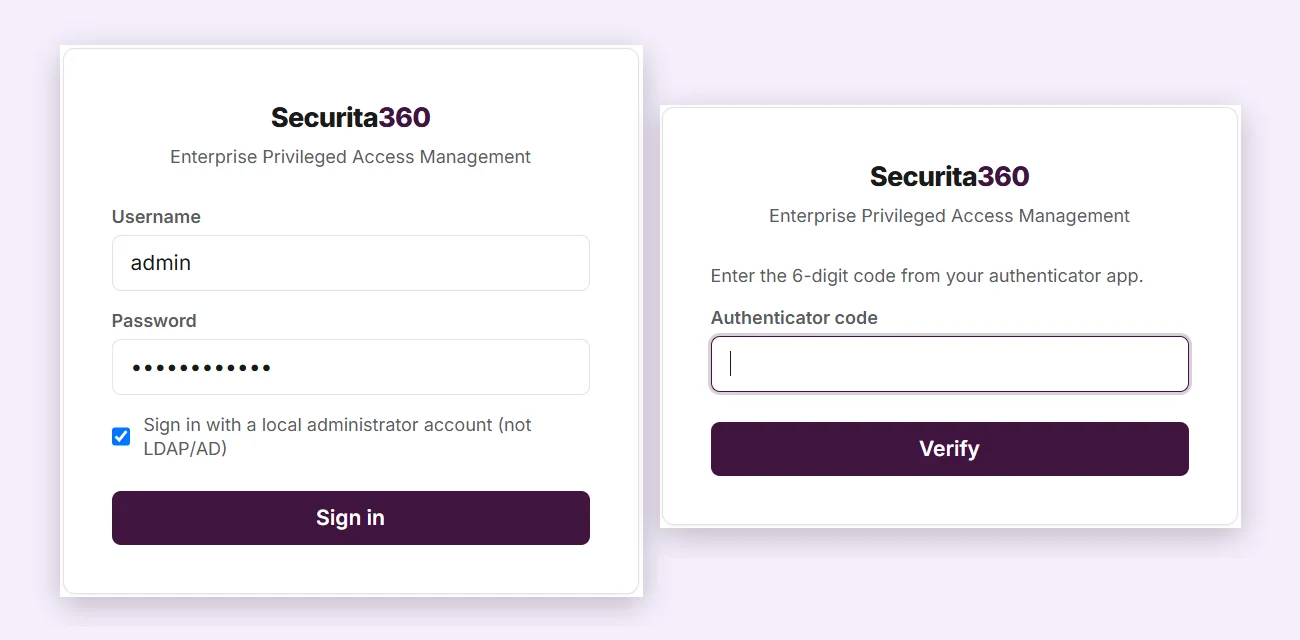
Step 1 · Identify
Step 2 · Secure
Step 3 · Control
Step 4 · Prove
Just-in-time access
Choose an approval chain, then try to break the rules: edit a request after it is approved, revoke a live session, or go around approval with break-glass.
Alex wants admin access to prod-db-01
Each step is enforced by Securita360, not by convention.
Illustrative. Approval chains, durations and caps are configured in Securita360. Sample data.
Command control
Run commands in a sample SSH session against a sample policy. Rules are checked in order, and the first match wins.
Evaluated when Enter is pressed in an SSH session
^rm\s+-rf\s+/TERMINATEcat /etc/shadowDENY^systemctl\s+stop\s+firewalldTERMINATEsudoWARNNo rule matches: ALLOW The command runs and is still recorded.
Pick a command to run it against the policy.
Illustrative. Command control covers SSH sessions, and violations alert your webhook, email or SIEM. Sample data.
Tamper-evident audit trail
Every event is chained to the one before it. Pick an event, tamper with it, and see whether the chain notices.
Illustrative. The hashes shown use a simple stand-in to demonstrate how chaining works. Sample data.
What changes
Access exists only inside an approved window, so there is no standing door to leave open.
Credentials stay in the vault and are injected server-side, so there is no password to paste into a chat.
Every session is recorded and every action is in one audit trail, so “who did that?” has an answer.
Hash-chained audit events and SIEM export give auditors something they can check.
Built with
Privileged access management
Vault, just-in-time access, browser-based sessions, command control, recording and a tamper-evident audit trail.
IT service management
Access requests can carry a ticket reference, for example an ITDesk incident or change, so every grant points at the work it was for.
Questions
No. Credentials are stored envelope-encrypted (AES-256-GCM), and the plaintext is never returned by an API, logged or shown. Only launching a session or rotating a credential ever touches it, and both happen server-side.
No. Sessions run through the Securita360 gateway from the browser, so SSH and RDP targets need no agent.
Break-glass gives immediate access capped at 60 minutes, with a mandatory reason. It is audited as an emergency, and someone else must review it afterwards.
No to both. Nobody can approve their own request, and editing a request after approvals have been collected invalidates them, so approvers must approve again. Approval chains can run in parallel or in sequence, with delegation.
Rotation is on demand. Securita360 changes the password on the target, verifies the new one works, and only then commits it to the vault. If the change can't be verified, the job is flagged for reconciliation instead of reporting success. It covers Linux and Unix accounts over SSH today. Windows, database and network-device rotation are not covered yet, and rotation is not scheduled automatically.
It covers SSH sessions, evaluated when Enter is pressed, and every command is recorded even if no policy exists. Rules run in order and the first match wins. There are two blind spots: shell history recall and tab completion, and full-screen programs such as vim. RDP has no text command channel to inspect.
Events are hash-chained, so changing or deleting an older event is detectable. The chain is checked on a schedule and a break raises an alert. The chain can't vouch for the very newest event by itself, which is why events can also be exported to your SIEM in CEF format.
Role-based access control, sign-in through your LDAP directory (configured at deployment) and authenticator-app (TOTP) multi-factor authentication.
Yes. Securita360 is built to run on your own infrastructure, in containers, so credentials, recordings and audit data stay with you.
See it on your own systems
Tell us about your environment and we'll show you Securita360 controlling access to it. No commitment required.