Manage incidents, service requests, changes, and enterprise support workflows from one centralized platform — powered by AI, accessible via WhatsApp, anytime and anywhere.
Your ticket INC-0091 has been resolved!via WhatsApp · just now
Meet your people where they work
WhatsApp
Email
Microsoft Teams
Slack
Web Portal
REST API
Product in action
See ITDesk running
Real screens from the product, not mock-ups.
itdesk · your-companyLive
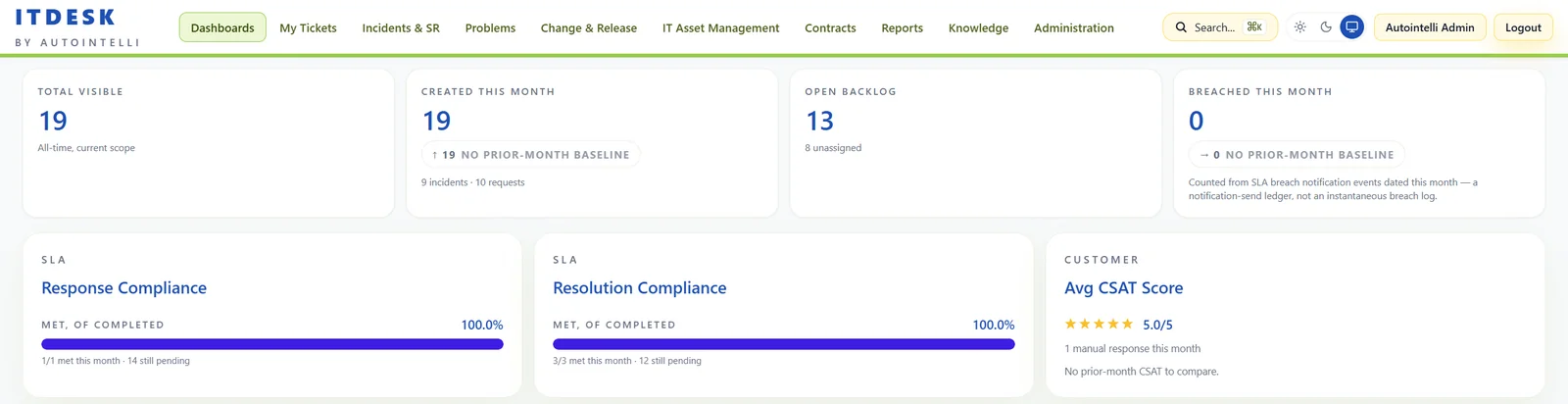
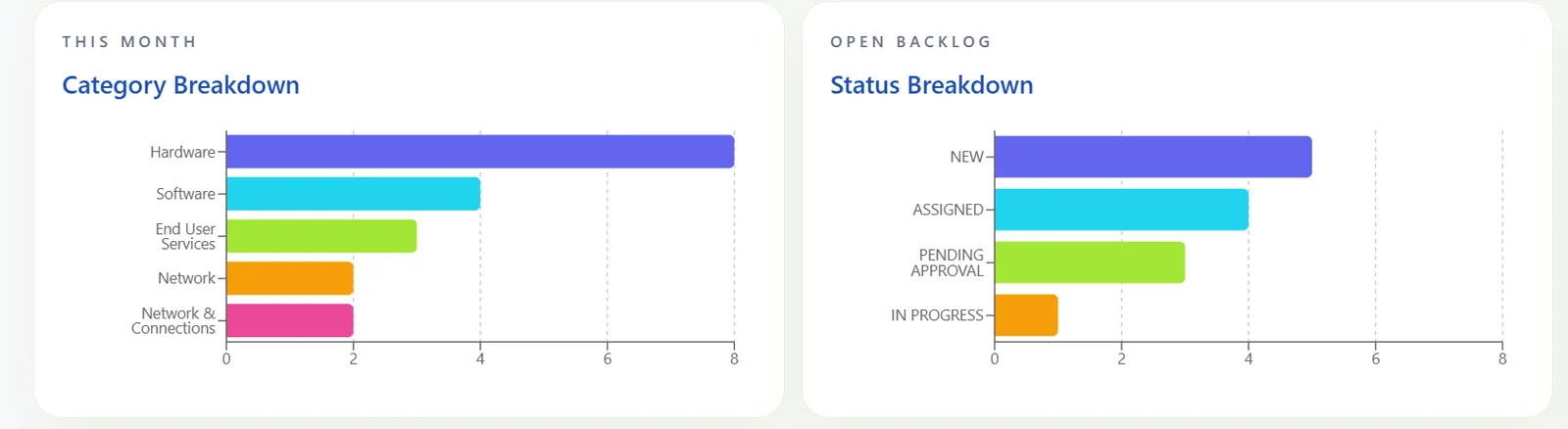
Screens from the live product; identifying details have been removed.
Why ITDesk
Eight reasons IT teams run on ITDesk
From the first email to the annual appraisal, one platform carries the whole story.
01
SLA management for vendors and technicians
Every clock accounted for — yours and your vendors'
Define SLA policies by priority, department, category or VIP status, run them on business-hours calendars, and let timers pause while you wait on a user or a vendor. Vendors carry their own response and resolution targets, so third-party delays are measured, not guessed.
Response and resolution targets per policy, with near-breach warnings
Business-hour calendars, holidays and pause-on-pending
Vendor targets tracked through acknowledge and resolve
SLA management for vendors and techniciansSample data
Technician · INC-0102
92%SLA met
Resolution · 3h 12m left
Pauses while pending user or vendor
Vendor · escalation ESC-018
Escalated10:05
Acknowledged10:22 · inside 30 min target
Resolution due14:05 · 4 h target
02
Automated ticket routing and business rules
Tickets reach the right team before anyone triages
Build business rules without code: choose a trigger, add conditions on priority, category, sub-category or assignee, and let ITDesk set fields, assign agents and route work to the right support group.
No-code rule builder with conditions and actions
SLA assignment by category, priority, department or VIP
Support groups and skill-based assignment
Automated ticket routing and business rulesSample data
WHENA ticket is created
IFCategory equals Network AND Priority equals High
THENAssign to Network Support · Set priority Critical
INC-0104 · Network · HighNetwork Support
SR-0051 · Laptop requestDesktop Support
INC-0105 · How do I…?Service Desk
03
Customer feedback and CSAT score
Hear from users while the fix is fresh
Collect a 1–5 rating and comments on each ticket, then watch the average CSAT on your dashboard. Feedback lands next to the SLA numbers, where service quality is actually decided.
1–5 rating with written feedback per ticket
Average CSAT on the live dashboard
Feeds directly into technician appraisal
Customer feedback and CSAT scoreSample data
4.8/ 5 average CSAT
5★78%
4★14%
3★5%
2★2%
1★1%
“Fixed quickly and kept me updated the whole way.”Requester feedback · INC-0098
04
Track annual technician performance
Appraisals backed by data, not memory
Pick a technician and a period — a quarter or the full year — and get tickets attended, work completed within SLA against breached, split by incidents and service requests, plus average CSAT.
Any date range, including the full year
SLA met versus breached by ticket type
Average CSAT per technician
Track annual technician performanceSample data
Q1Q2Q3Q4Full year
Attended412
Within SLA94%
Avg CSAT4.7
Incidents 238 attended
Within SLA 93%
Breached 7%
Service Requests 174 attended
Within SLA 96%
Breached 4%
05
No additional modules required
One platform. Nothing to bolt on.
Incidents, service requests, change and problem management, IT configuration management, contract management, knowledge management, the service catalogue with approvals, SLA management and WhatsApp ticketing — all in one product, on one login, sharing one set of data.
Full ITSM and ITAM in a single platform
Catalogue requests with approvals built in
WhatsApp ticketing without a separate tool
No additional modules requiredSample data
Incidents
Service Requests
Change Mgmt
Problem Mgmt
IT Configuration
Contracts
Knowledge
Catalog & Approvals
SLA Management
WhatsApp Ticketing
No add-on modules to buy or integrate
06
Vendor management
Bring third parties inside your process
Keep vendors in the same workflow as your own teams. Escalate a ticket to a vendor, capture their acknowledgement and resolution, and keep notes on the ticket — while the SLA timer respects the wait.
Vendor directory with response and resolution targets
Escalate to a vendor and track acknowledge and resolve
Notes and history stay on the ticket
Vendor managementSample data
Network CarrierResponse 30 min · Resolution 4 h
Acknowledged
Hardware OEMResponse 1 h · Resolution 8 h
Escalated
Software VendorResponse 2 h · Resolution 24 h
Resolved
Escalation notes · INC-0102
10:22 Carrier acknowledged, engineer dispatched.
13:40 Fibre repaired. Vendor marked resolved.
07
SSO, LDAP and MFA with audit logs
Enterprise sign-in, with a trail to prove it
Sign in through SAML single sign-on, federate your LDAP or Active Directory through it, require multi-factor authentication by role, and provision users with SCIM. Every administrative action and sign-in event lands in the audit log.
SAML single sign-on and SCIM provisioning
Authenticator-app or email OTP MFA, enforced by role
Audit log with actor and timestamp on every entry
SSO, LDAP and MFA with audit logsSample data
Single sign-on
Continue with SSO
SAML · your directory (LDAP / Active Directory) federated through SAML
Multi-factor
438192
Authenticator app or email OTP, enforced by role
Audit log
09:41Loginvia SSO, MFA verified
09:47UpdateSLA policy changed
09:52CreateUser role assigned
08
Mail-to-ticket integration
Email in. Ticket out.
Point ITDesk at your support mailbox and every incoming email becomes an incident automatically. Nothing gets lost in a shared inbox, and users keep working the way they already do.
Inbound mailbox polling you can switch on or off
Every email converted into an incident
Lands in the same queue as every other channel
Mail-to-ticket integrationSample data
Inbox · support@yourcompany
VPN not connecting from home
Hi team, since this morning I can't connect to the VPN…
From: a.sharma · 09:12
Ticket created
INC-0103 · VPN not connecting from home
IncidentNetworkHigh
Now in the queue with SLA running
What's included in ITDesk
Everything your IT team needs, out of the box
One platform for service management, assets, contracts and knowledge — with SLAs and automation running through all of it.
Spotlight
Incidents & Service Requests
Smart views, powerful filters, assignment to technicians and support groups, approvals and per-ticket SLA clocks.
Find root causes, plan and approve changes with risk assessment, and coordinate release plans and scheduled changes.
Service Catalog
Publish request forms, bundles and recurring requests with approval stages and fulfilment tasks.
OMNI Channel Integrations
Raise and track tickets via WhatsApp, email and the web portal, with Slack, Teams and webhook notifications.
AI-Enabled ITSM
AI classification, smart KB suggestions, and automated ticket routing out of the box.
IT Asset & Software Management
Configuration items, hardware lifecycle, software inventory, and license tracking.
Contracts, Licenses & Vendors
Track vendor contracts and licenses with expiry alerts, renewals and vendor escalation.
Knowledge Base
A searchable self-service portal with versioned articles and ratings that reduces ticket volume.
Workflows & Automation
Automation rules, workflows, skill-based routing and escalation rules that keep tickets moving.
Reports
Exportable reports and analytics for leadership, including SLA and technician performance.
Security & Administration
Single sign-on, SCIM provisioning, multi-factor authentication, roles and permissions, and a full audit log.
Incidents & Service Requests
One desk for every request
Give technicians a fast, focused queue — and give users a single place to ask for help.
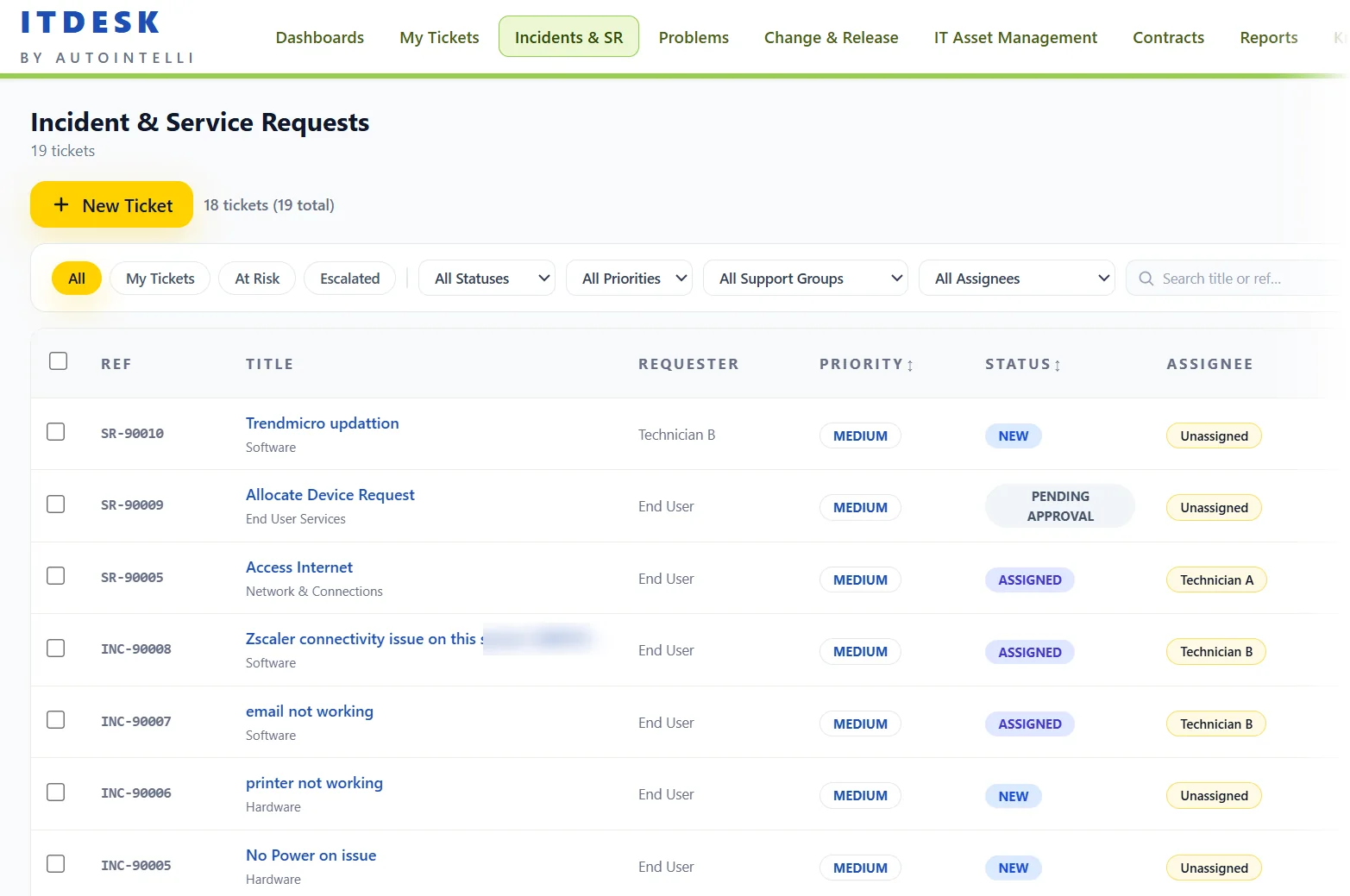
Views and filters that fit the jobJump between All, My Tickets, At Risk and Escalated, then narrow by status, priority, support group or assignee, or search by title or reference.
SLA clocks on every ticketResponse and resolution time remaining sit beside each ticket, so nothing quietly runs out of time.
Assignment and approvalsRoute to a technician or support group, hold requests for approval, and act on many tickets at once.
Screenshot from the product; figures are demonstration data.
ITDesk Support Bot● Online — powered by AI
Hi John! I'm your ITDesk assistant. How can I help you today?9:02 AM
My laptop screen is flickering since the update.9:03 AM
Got it! I've raised INC-0094 for you — "Laptop screen flickering after update".
Priority: High · Assigned to: Desktop Support Est. resolution: within 4 hours.9:03 AM
I also found a knowledge article that might help in the meantime. Want me to send it?9:03 AM
Yes please!9:04 AM
Fix: Display driver rollback steps KB-00112 · 2 min read9:04 AM
Check ticket statusEscalate ticketRaise new request
AI-Enabled ITSM
Support your team from anywhere, on any device
ITDesk's AI layer understands natural language, auto-classifies tickets, suggests knowledge articles, and routes requests to the right team — without a single manual rule. And with WhatsApp as a first-class channel, your end users never need to open a browser.
WhatsApp — raise, track & close ticketsEnd users raise incidents, check status, and receive updates directly on WhatsApp. Zero portal logins needed.
AI auto-classification & smart routingEvery incoming ticket is classified by category, priority, and impact automatically — then routed to the right team and SLA bucket.
Proactive notifications, anytime anywhereSLA breaches, approvals, and status changes are pushed instantly to users via WhatsApp, Email, Slack or Teams — wherever they are.
A complete platform
Everything included, nothing bolted on
Service management, SLAs, catalog, knowledge, assets, channels and security — in one product.
39+Capabilities included
6Capability areas
6+Ticket channels & alerts
1Platform, one login
IncidentsLog, triage, resolve
Service RequestsFulfilment tasks
Problem ManagementRoot cause and linked tickets
Change RequestsRisk and CAB approval
Release PlansPlan and track
Scheduled ChangesPlanned maintenance
ApprovalsMulti-stage approval
SLA PoliciesResponse and resolution
SLA CalendarsBusiness hours and holidays
Escalation RulesNotify and reassign
Automation RulesNo-code business rules
WorkflowsAutomated routing
Skills & Support GroupsRoute to the right team
Technician AppraisalSLA and CSAT by technician
Service CatalogRequest forms and bundles
Recurring RequestsScheduled fulfilment
Knowledge BaseVersions and ratings
Article TemplatesConsistent articles
Self-Service PortalUsers help themselves
CSAT SurveysFeedback on every ticket
IT Asset ManagementConfiguration items
Software LicensesTrack and expire
ContractsRenewals and expiry alerts
Vendor ManagementTargets and escalation
Expiry NotificationsAssets and contracts
WhatsAppTicketing over Meta Cloud API
Mail-to-TicketEmail becomes an incident
Microsoft TeamsNotifications
SlackNotifications
SMSText notifications
WebhooksCustom integrations
API CredentialsREST integration
Single Sign-OnSAML federation
SCIM ProvisioningUser lifecycle
Multi-Factor AuthAuthenticator app or email OTP
Roles & PermissionsLeast-privilege access
Audit LogWho did what, when
Custom FieldsFit your process
BrandingMake it yours
Running Unified360 for monitoring?ITDesk pairs with Autointelli's Unified360 network and infrastructure monitoring platform, so alerts and tickets live in one operations story.