
Fragmented
One tool per vendor, one for the firewalls, another for Wi-Fi and a spreadsheet for the carriers. Nobody has the whole picture.
IT OPERATIONS
Unified360IT operations & observability platformNetwork TopologyAuto-discovered mapsLink UtilizationBandwidth and link qualityBusiness Service ManagementApplications, services and impactIPAMSubnets, IPs and conflictsAlerting & EscalationDetect, notify, recoverSERVICE & ASSETS
ITDeskIT service management platformIncidents & SLAsOne desk for every requestIntelliAssetIT asset & patch managementPatch ManagementDetect, deploy, roll backISMS Audit PackISO 27001 evidence, readyBY CHALLENGE
Blind Spots in InfrastructureNo extra tools: hardware to URLs on one screenSlow Ticket ResolutionRoute, watch and escalate to fix fasterUnknown Assets & Unpatched SystemsKnow what you own, patch what's exposedUncontrolled Privileged AccessVault, approve, record and auditManual, Repetitive OperationsAutomate approvals and remediationAudit & Compliance PressureEvidence on demandBY STACK
Networks & WirelessSwitches, firewalls and controllersServers & DatabasesWindows, Linux and leading databasesVirtual & Hybrid EstatesHypervisors and hybrid workloadsEndpoints & DevicesAgent-based inventory and updatesRemote & Privileged SessionsAgentless SSH, RDP and VNCTools & IntegrationsITSM, SIEM, webhooks and emailLEARN
Quick Start GuidesSoonGet productive with any Autointelli product in minutes.Product DocumentationAdmin manuals, how-tos and API references.Integration CatalogSoonWhat Autointelli connects to, and how.IT Terms ExplainedPlain-language definitions of everyday IT jargon.DISCOVER
Customer StoriesHow organisations get measurable results.WhitepapersResearch on IT operations, ITSM, ITAM and PAM.Ebooks & PlaybooksPractical, step-by-step operating guides.Product DatasheetsCapabilities and technical specifications.Why AutointelliHow we differ from other platforms.Compare AutointelliSide-by-side with tools you may be weighing.Solution · By Stack
Switches, firewalls, WAN links, wireless controllers and cloud-managed access points each arrive with their own console. Unified360 brings them together: SNMP templates for the wired estate, firewall and SD-WAN health, controller and cloud Wi-Fi status, link quality and topology, with configuration changes tracked.
The problem
The devices are monitored somewhere. The trouble is that "somewhere" is six different places.
One tool per vendor, one for the firewalls, another for Wi-Fi and a spreadsheet for the carriers. Nobody has the whole picture.
A circuit degrades, an AP disappears or a firewall fails over, and users notice first because nothing raised an alert.
Nobody can say how it is connected, or what changed on a device last week.
Where it goes wrong
How it goes wrongThe estate mixes Cisco, Arista, Dell, Cumulus and NVIDIA, and each one brings its own tool.
Closed withVendor SNMP templates with a generic-switch fallback: CPU, memory, temperature, power and fans where the platform exposes them, and interfaces with errors and discards.
How it goes wrongThousands of interfaces, most of them unimportant, and one uplink that matters.
Closed withInterface up/down rules that fire after consecutive down polls, baseline newly seen interfaces so they don't alert, and page through very large interface counts.
How it goes wrongA firewall can be up and still be in trouble: full memory, exhausted sessions, a failed-over HA pair.
Closed withFortigate memory, sessions, VPN tunnel state and traffic, and SD-WAN link health. Palo Alto management and data-plane CPU and HA state. Per-device dashboards for each.
How it goes wrongAccess points live on a controller, in a vendor cloud, or both, and nobody has one view.
Closed withCisco WLC AP status and SSID clients over SNMP, Ruckus and Extreme templates, and Aruba Central, Meraki and Cambium cnMaestro through their APIs, with overview dashboards for devices, alerts and clients.
How it goes wrongThe carrier says the circuit was fine. You have no data to say otherwise.
Closed withLink monitoring for ISP, ILL and MPLS circuits: latency, jitter, packet loss and utilization against provisioned bandwidth, with the circuit ID, vendor and committed uptime on record.
How it goes wrongA switch or firewall is edited, and the first sign is an outage.
Closed withConfig Backup captures configurations on a schedule, keeps a snapshot only when something changed, lets you compare two snapshots, and raises a drift alert.
Vendor coverage
Built from the SNMP templates and integrations shipped today, including where a template still needs you to confirm your platform.
CPU over 5 seconds and 1 minute, memory, temperature, power supplies, fans and interfaces.
C1200 and C1300 series: interface counters, CPU utilization, discards and temperature. Tested on a Catalyst 1200.
System, interface, CPU and memory metrics.
System information, CPU, memory and network interface metrics.
System, CPU, memory and interface metrics.
System, interface, CPU and memory metrics.
System, interface, CPU and memory metrics.
Any switch with standard MIBs: CPU and memory, interfaces with errors, discards and duplex, temperature, fans, power and spanning-tree changes.
System, memory, sessions, VPN tunnels and SD-WAN health checks, with per-interface status and traffic.
Model, serial and version, management and data-plane CPU, memory, sessions and HA state.
Basic health templates for these appliances.
Catalyst 9800 and AireOS-compatible: CPU, memory, interfaces, AP status and SSID client counts. Confirmed on a C9800.
ZoneDirector: AP status, radios and SSID clients.
Confirm your platform first. SmartZone uses different tables and needs the template adjusted.
A template for Extreme wireless controllers.
Confirm the platform family before relying on it. Extreme's controllers use different management models.
Devices, status, alerts and wireless clients through the cloud API: access points, switches and gateways up, and a refresh-token watch.
Organizations, devices and active clients, with device-down alerts and an AP client-count threshold rule.
Cloud tenant or on-prem server: access points and clients, with device-down alerts and AP radio performance thresholds.
"Confirmed" means the mapping was checked against a real device. "Needs validating" and "unverified" mean it's provided but should be tried against your platform first. Any SNMP-capable device falls back to the generic template.
Topology and addressing
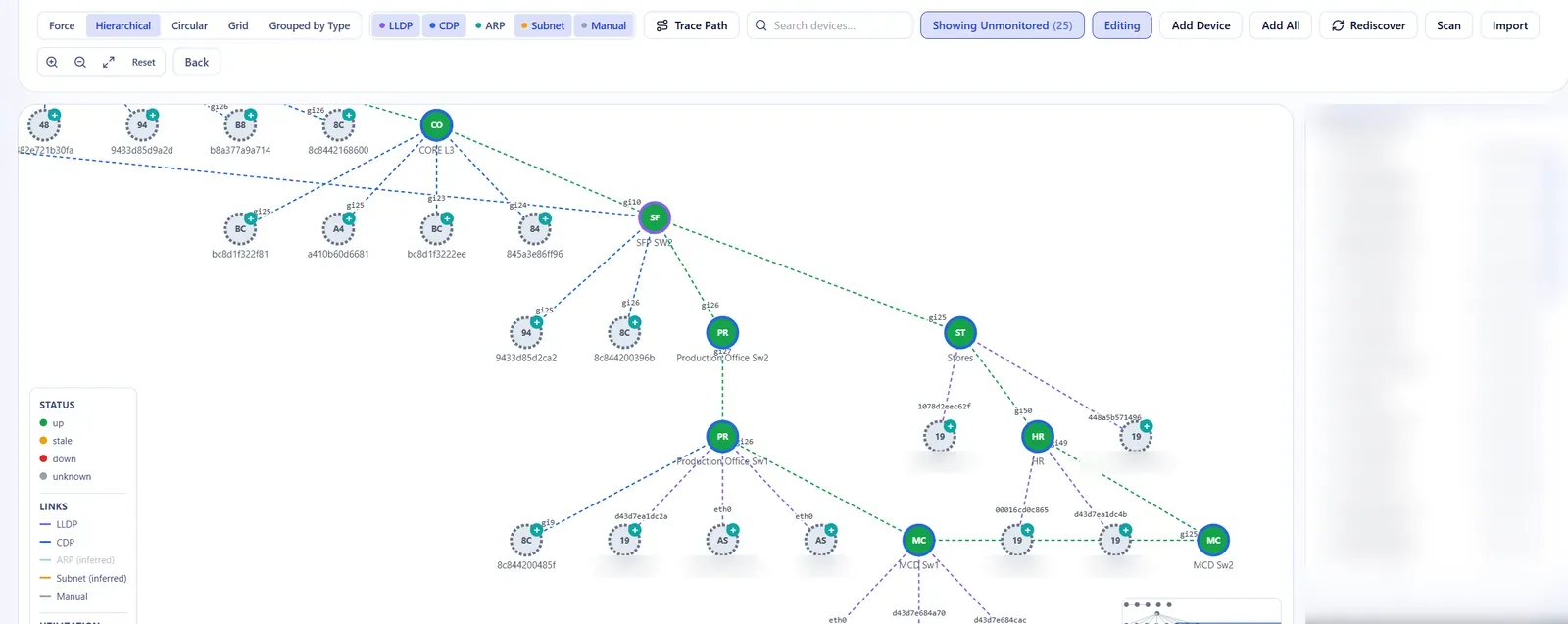
The map is built from what the network already says about itself, with room for the links discovery can't see.
See it live
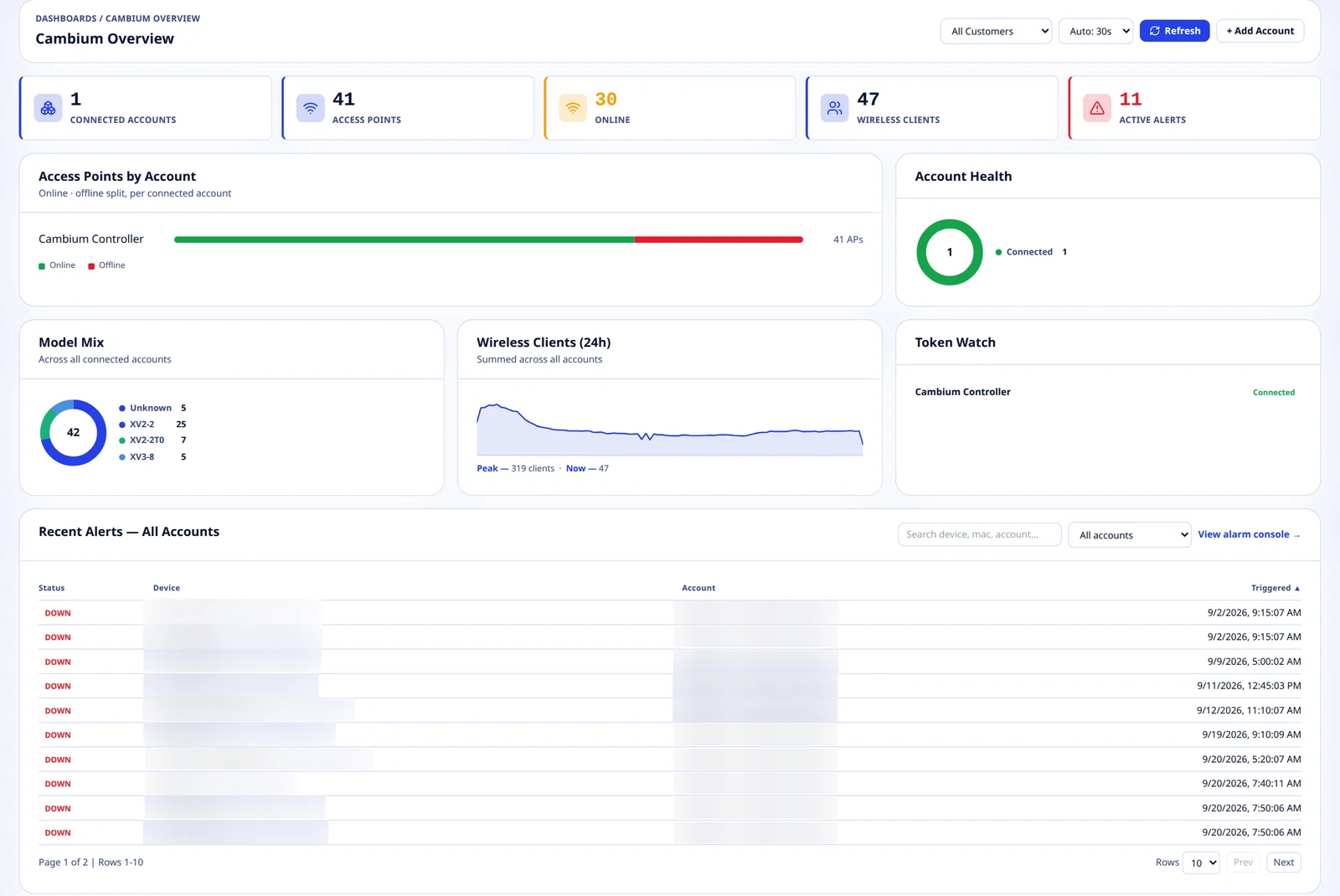
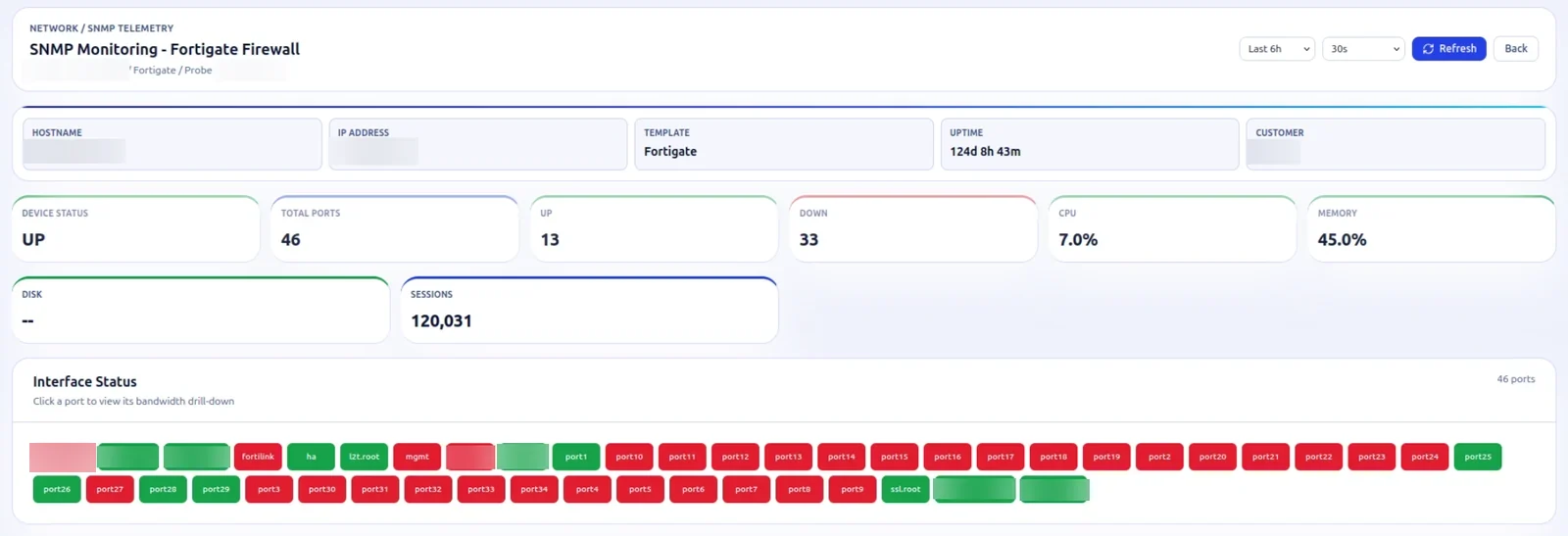
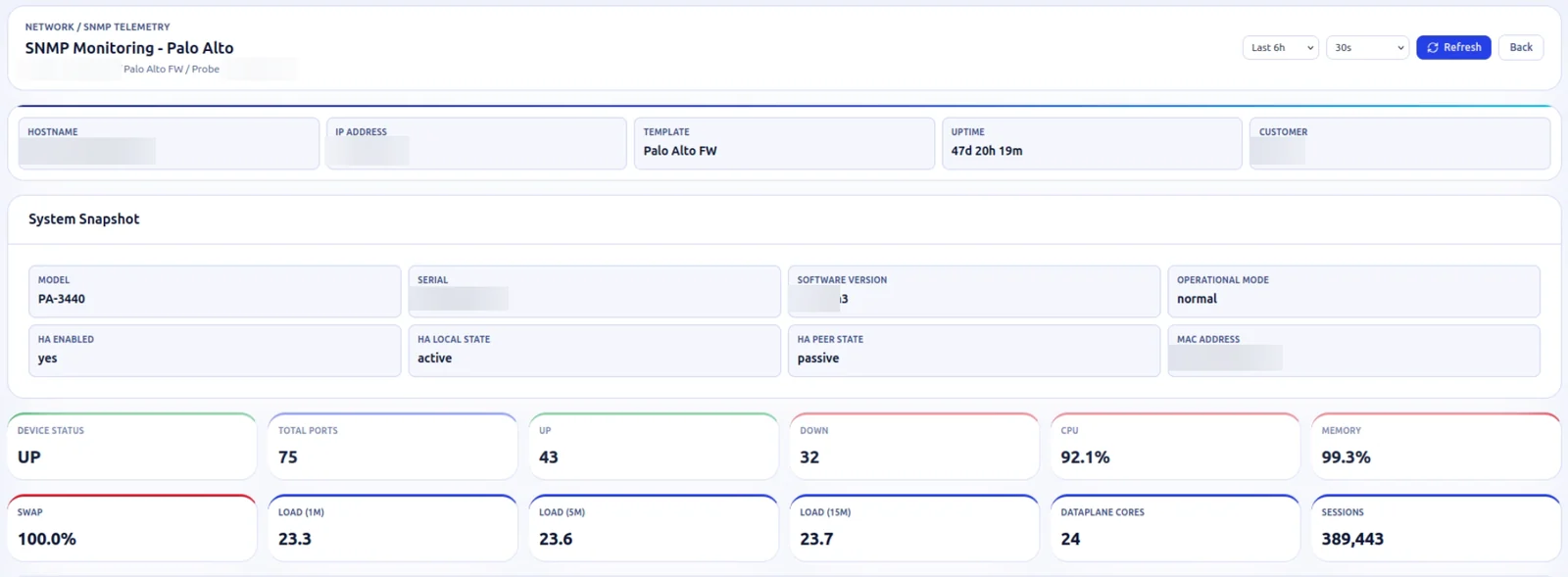
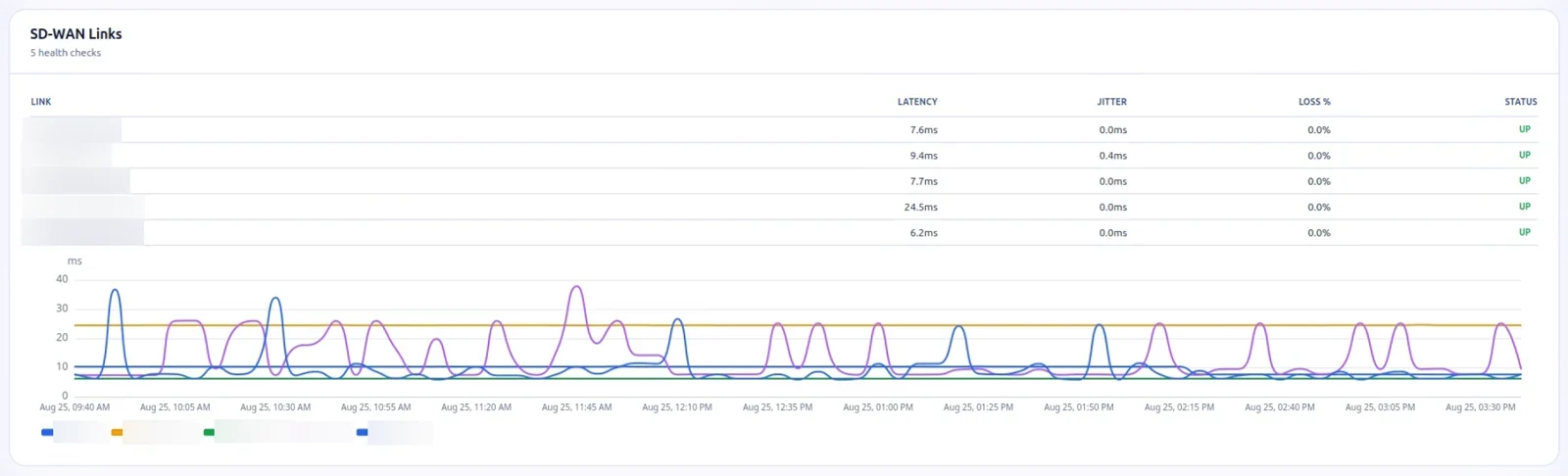
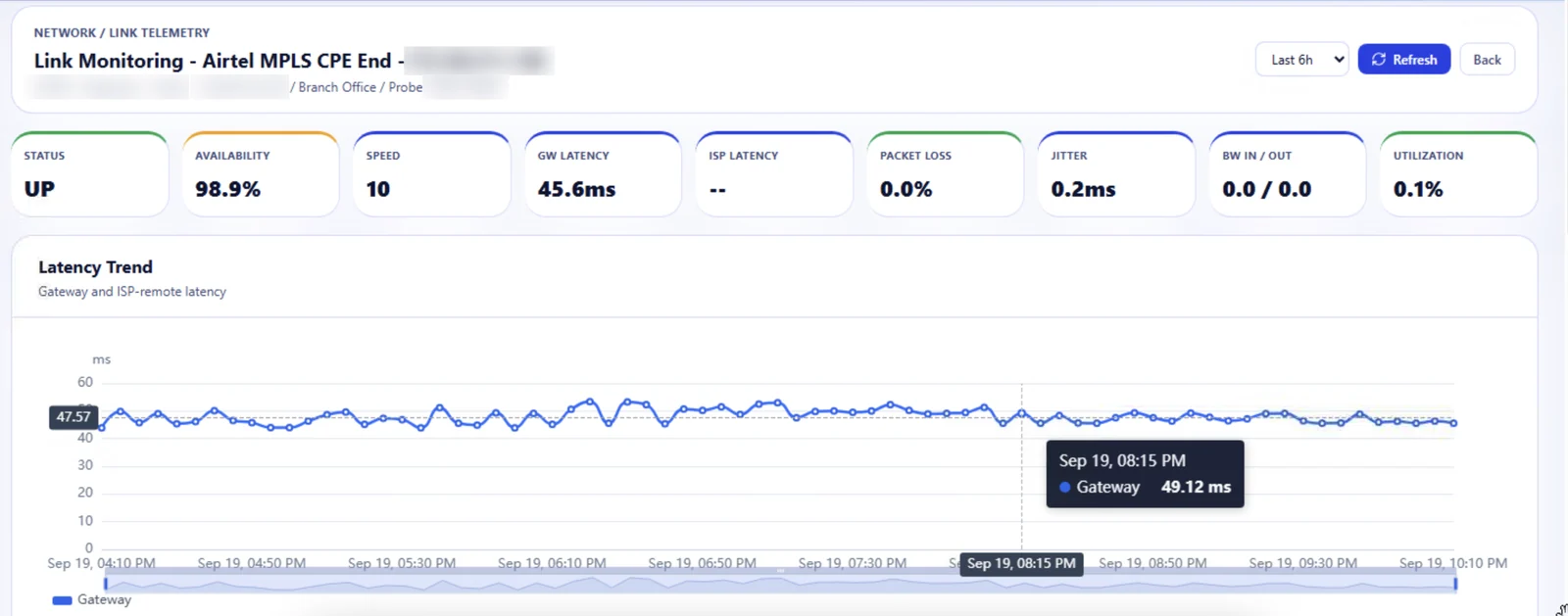
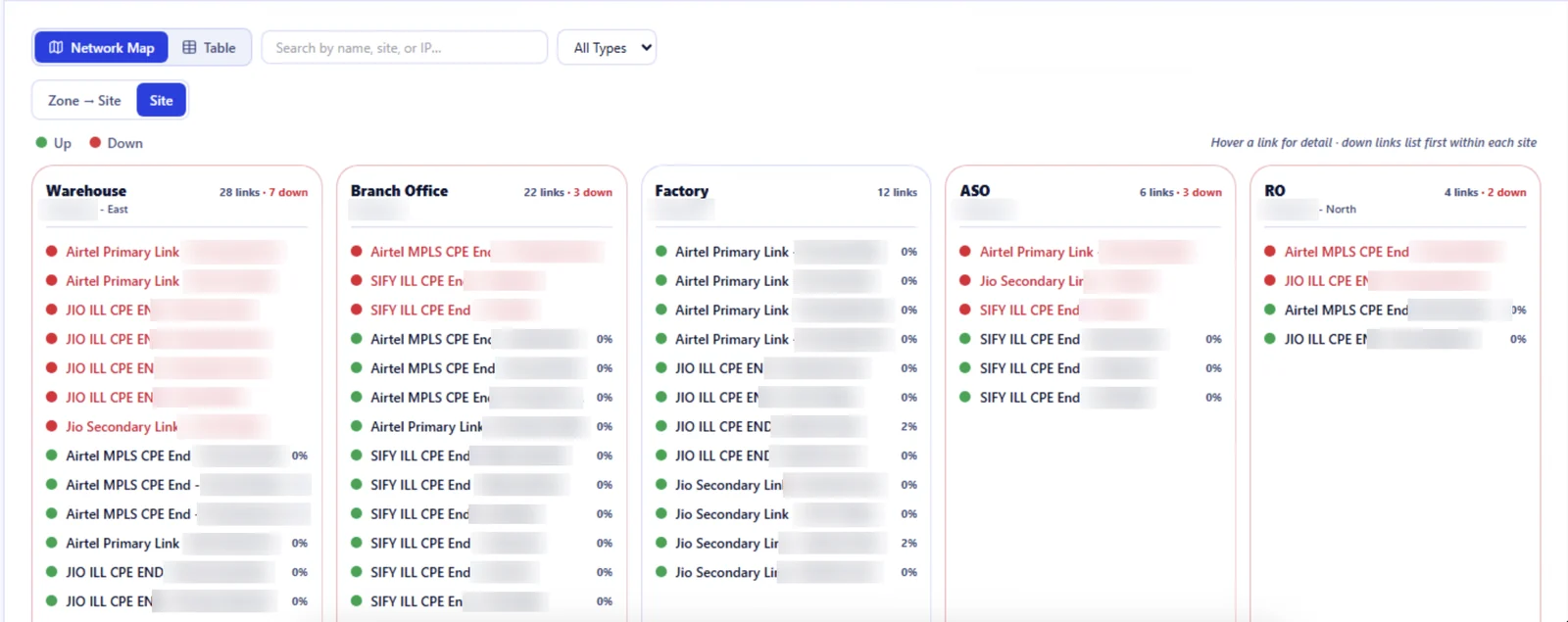
Screens are from Unified360 running test data; hostnames, addresses, serial numbers, access point names, customer names and carrier names have been blurred.
What changes
Switches, firewalls, controllers and cloud Wi-Fi report into the same platform, instead of one console each.
Interfaces, firewalls, links, access points and config changes each have rules, with recovery when they clear.
Measured latency, loss and availability sit beside the committed uptime for each circuit.
Config snapshots and a diff show what changed on a device, and drift raises an alert.
Built with
Operations and observability
SNMP monitoring, firewall and SD-WAN health, wireless controllers and cloud Wi-Fi, link monitoring, topology, IPAM and config backup.
IT asset management
Finds network devices by SNMP, IP range and subnet, and tracks warranty and end-of-life for the hardware you find.
Questions
There are SNMP templates for Cisco, Arista, Dell, Cumulus, NVIDIA, Fortigate, Palo Alto, Fortiweb, Imperva, Array and a generic switch, plus Cisco, Ruckus and Extreme wireless controllers. Aruba Central, Meraki and Cambium cnMaestro are covered through their APIs. Any other SNMP-capable device falls back to the generic template.
Monitoring runs through a Unified360 agent at the site, and proxy servers let remote sites report back to one console. The cloud wireless platforms are polled by the site agent through their APIs too.
Cisco WLC coverage is confirmed on a Catalyst 9800, and Cambium cnMaestro is running against a live account. The Ruckus template is written for ZoneDirector, and SmartZone needs its tables swapped in. The Extreme template needs the platform family confirmed. For the cloud platforms, coverage is device status, alerts and clients, with AP thresholds on Meraki and Cambium.
Cisco controllers stop listing an AP that has left instead of marking it down, so the status never changes. Unified360 treats an AP whose last-seen time has gone stale as down, and raises the alert.
Interface alerts fire only after the interface has been down for a set number of consecutive polls, and recover when it comes back up. A newly discovered interface is baselined and doesn't alert.
Yes. Link monitoring tracks latency, jitter, packet loss and utilization for each circuit against its provisioned bandwidth, and records the circuit ID, vendor and committed uptime. Links can use SNMP v2c or v3.
Configs are captured on an interval set by device role and stored as snapshots only when something changed. You can compare any two snapshots, and a drift rule alerts on a change. Fortigate and Palo Alto use their APIs, and Cisco 9000, Arista and Dell SmartFabric use SSH. Other vendors use a CLI fallback and are flagged as unverified.
From LLDP, CDP, ARP and subnet data, with manual links for anything discovery can't see. You can filter the map by discovery source and run a rediscover to refresh it.
See it on your own network
Tell us which vendors you run and we'll show you Unified360 covering them. No commitment required.