
Shared
Admins connect with passwords they can copy, share and keep. Nobody rotates them.
IT OPERATIONS
Unified360IT operations & observability platformNetwork TopologyAuto-discovered mapsLink UtilizationBandwidth and link qualityBusiness Service ManagementApplications, services and impactIPAMSubnets, IPs and conflictsAlerting & EscalationDetect, notify, recoverSERVICE & ASSETS
ITDeskIT service management platformIncidents & SLAsOne desk for every requestIntelliAssetIT asset & patch managementPatch ManagementDetect, deploy, roll backISMS Audit PackISO 27001 evidence, readyBY CHALLENGE
Blind Spots in InfrastructureNo extra tools: hardware to URLs on one screenSlow Ticket ResolutionRoute, watch and escalate to fix fasterUnknown Assets & Unpatched SystemsKnow what you own, patch what's exposedUncontrolled Privileged AccessVault, approve, record and auditManual, Repetitive OperationsAutomate approvals and remediationAudit & Compliance PressureEvidence on demandBY STACK
Networks & WirelessSwitches, firewalls and controllersServers & DatabasesWindows, Linux and leading databasesVirtual & Hybrid EstatesHypervisors and hybrid workloadsEndpoints & DevicesAgent-based inventory and updatesRemote & Privileged SessionsAgentless SSH, RDP and VNCTools & IntegrationsITSM, SIEM, webhooks and emailLEARN
Quick Start GuidesSoonGet productive with any Autointelli product in minutes.Product DocumentationAdmin manuals, how-tos and API references.Integration CatalogSoonWhat Autointelli connects to, and how.IT Terms ExplainedPlain-language definitions of everyday IT jargon.DISCOVER
Customer StoriesHow organisations get measurable results.WhitepapersResearch on IT operations, ITSM, ITAM and PAM.Ebooks & PlaybooksPractical, step-by-step operating guides.Product DatasheetsCapabilities and technical specifications.Why AutointelliHow we differ from other platforms.Compare AutointelliSide-by-side with tools you may be weighing.Solution · By Stack
Remote access is where credentials leak and accountability disappears. Autointelli brokers SSH and RDP sessions from the browser with the password injected server-side, grants access only when approved, checks SSH commands against policy, and records the session. For everyday desktop support, remote control asks the user first.
The problem
The easier it is to connect, the harder it is to say who did what.
Admins connect with passwords they can copy, share and keep. Nobody rotates them.
Remote access is left open long after the job it was for.
When something goes wrong, there is no recording and no record of the commands.
Where it goes wrong
How it goes wrongA password shown to a user is a password they can keep.
Closed withThe gateway injects the credential on the server and never sends it to the browser, and the vault keeps versioned, encrypted copies.
How it goes wrongA grant made for one job stays open.
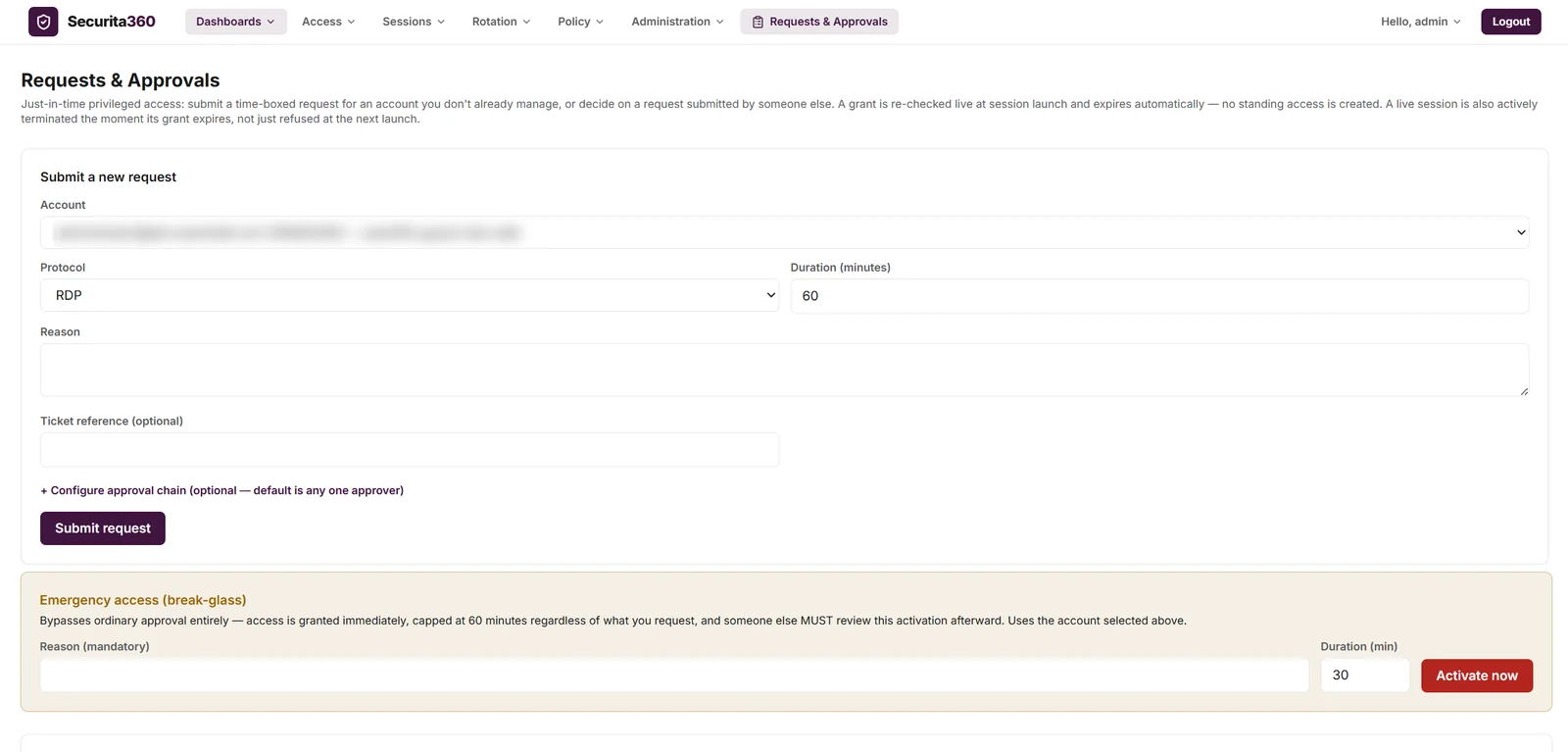
Closed withJust-in-time grants with a reason, approvers and an expiry, re-checked at launch, with live sessions ended when a grant expires or is revoked.
How it goes wrongAny network and any hour can reach a server.
Closed withSession policy limits protocols, source networks, time windows and concurrent sessions, and can show an access banner.
How it goes wrongA destructive command runs on a production host.
Closed withSSH command policy with ordered rules: allow, warn, deny or terminate, with every command recorded.
How it goes wrongAfter an incident there is nothing to replay.
Closed withEncrypted session recordings, played back only through a fresh authorisation, with a SHA-256 integrity value.
How it goes wrongRemote control that connects without consent.
Closed withIntelliAsset remote control shows the user a consent prompt, lets them decline or end it, and keeps a session history.
Three ways in
Pick a route to see what it does and where it stops.
Securita360: browser-based SSH and RDP to servers, with the credential kept in the vault.
Unified360's Remote Console: browser-based RDP or SSH to a monitored server or desktop, straight from its dashboard.
IntelliAsset remote control for helping a user at their own desktop.
Endpoint support
All three keep a record. Only Securita360 adds approvals, command control and encrypted recordings.
What changes
Credentials are injected on the server, so there is nothing for a user to copy.
Grants expire on their own, and revoking one ends the live session.
SSH commands are checked against an ordered policy, and every one is recorded.
Encrypted recordings and a tamper-evident audit trail answer who did what.
Built with
Privileged access management
Vault, just-in-time access, browser sessions, command control, recording and a hash-chained audit trail.
Asset and patch management
Consent-based remote control for endpoints.
Operations and observability
Remote Console for RDP and SSH from monitoring dashboards.
Questions
No. Securita360 stores credentials envelope-encrypted and injects them into the session on the server, so the plaintext is never sent to the browser.
SSH and RDP from the browser, with nothing installed on the target. VNC brokering is built but has not been verified against a live target, so it isn't offered here.
Not yet as a claim. The implementation exists, but it has not been tested against a real VNC server.
A session policy sets allowed protocols, source network ranges, an allowed time window and a limit on concurrent sessions per user, and an access banner can be shown.
Yes. Live sessions can be watched and terminated, and a session ends when its grant expires or is revoked, within one heartbeat interval.
SSH sessions, evaluated when Enter is pressed. It has blind spots for shell history recall, tab completion and full-screen programs, and RDP has no text command channel.
Remote control in IntelliAsset is for helping a user at their desktop, with their consent. Securita360 is for privileged access to servers, with approvals, command control and recording.
See it on your own servers
Tell us how your team connects today and we'll show you Securita360 controlling it. No commitment required.