
End-to-end orchestration
Chain any sequence of IT actions — across servers, network, cloud and applications — into a single automated process, instead of stitching together point scripts by hand.
IT OPERATIONS
Unified360IT operations & observability platformNetwork TopologyAuto-discovered mapsLink UtilizationBandwidth and link qualityBusiness Service ManagementApplications, services and impactIPAMSubnets, IPs and conflictsAlerting & EscalationDetect, notify, recoverSERVICE & ASSETS
ITDeskIT service management platformIncidents & SLAsOne desk for every requestIntelliAssetIT asset & patch managementPatch ManagementDetect, deploy, roll backISMS Audit PackISO 27001 evidence, readyBY CHALLENGE
Blind Spots in InfrastructureNo extra tools: hardware to URLs on one screenSlow Ticket ResolutionRoute, watch and escalate to fix fasterUnknown Assets & Unpatched SystemsKnow what you own, patch what's exposedUncontrolled Privileged AccessVault, approve, record and auditManual, Repetitive OperationsAutomate approvals and remediationAudit & Compliance PressureEvidence on demandBY STACK
Networks & WirelessSwitches, firewalls and controllersServers & DatabasesWindows, Linux and leading databasesVirtual & Hybrid EstatesHypervisors and hybrid workloadsEndpoints & DevicesAgent-based inventory and updatesRemote & Privileged SessionsAgentless SSH, RDP and VNCTools & IntegrationsITSM, SIEM, webhooks and emailLEARN
Quick Start GuidesSoonGet productive with any Autointelli product in minutes.Product DocumentationAdmin manuals, how-tos and API references.Integration CatalogSoonWhat Autointelli connects to, and how.IT Terms ExplainedPlain-language definitions of everyday IT jargon.DISCOVER
Customer StoriesHow organisations get measurable results.WhitepapersResearch on IT operations, ITSM, ITAM and PAM.Ebooks & PlaybooksPractical, step-by-step operating guides.Product DatasheetsCapabilities and technical specifications.Why AutointelliHow we differ from other platforms.Compare AutointelliSide-by-side with tools you may be weighing.A version-controlled workflow designer, a script engine that runs Python, PowerShell and Bash remotely, and a self-service portal end users can trigger on demand — built on the BPMN2 workflow standard, with an API on every deployed process and a built-in credential store handling authentication for you.
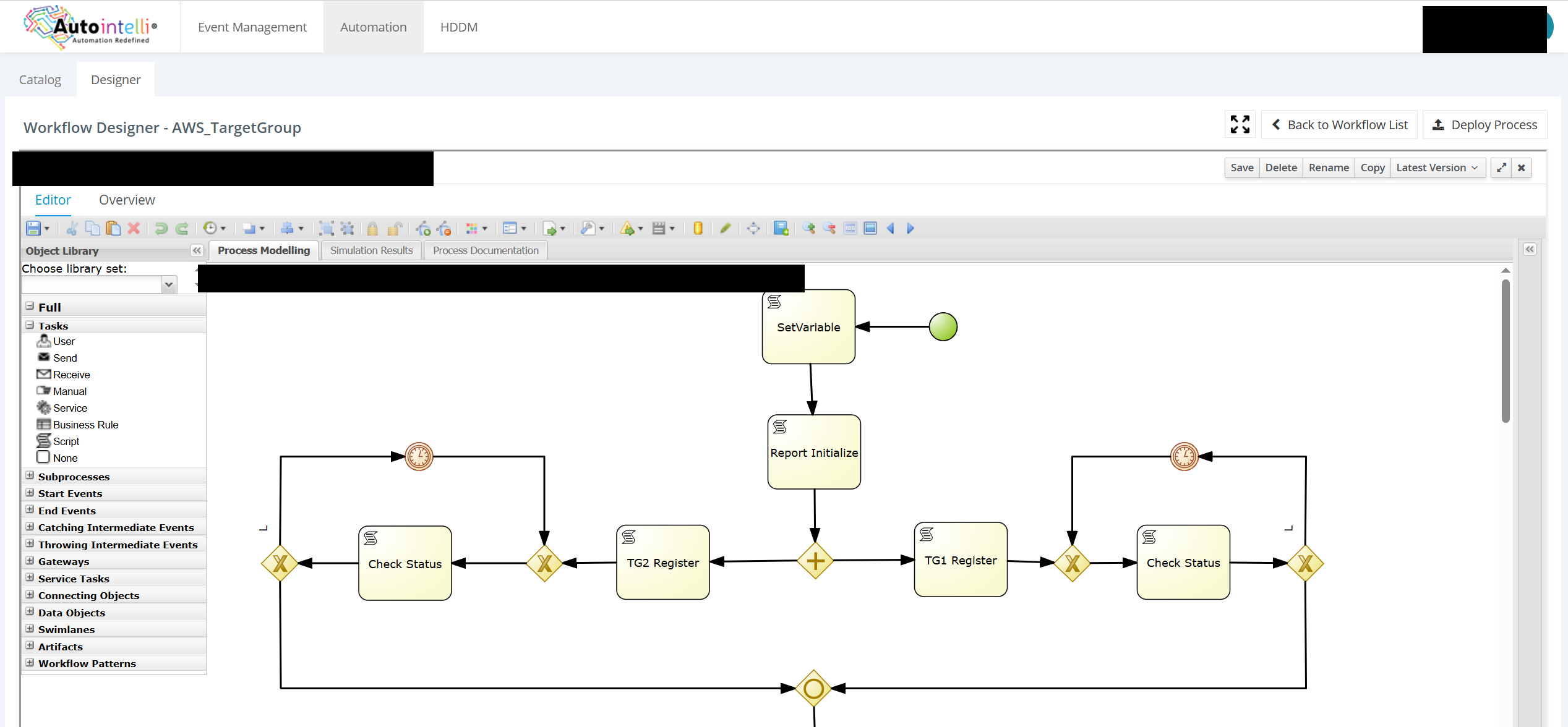
Version-controlled workflow designer — Process Modelling canvas
Product tour
Three views into the same platform: the designer teams build in, the catalog end users run from, and the dashboard operations reports from.
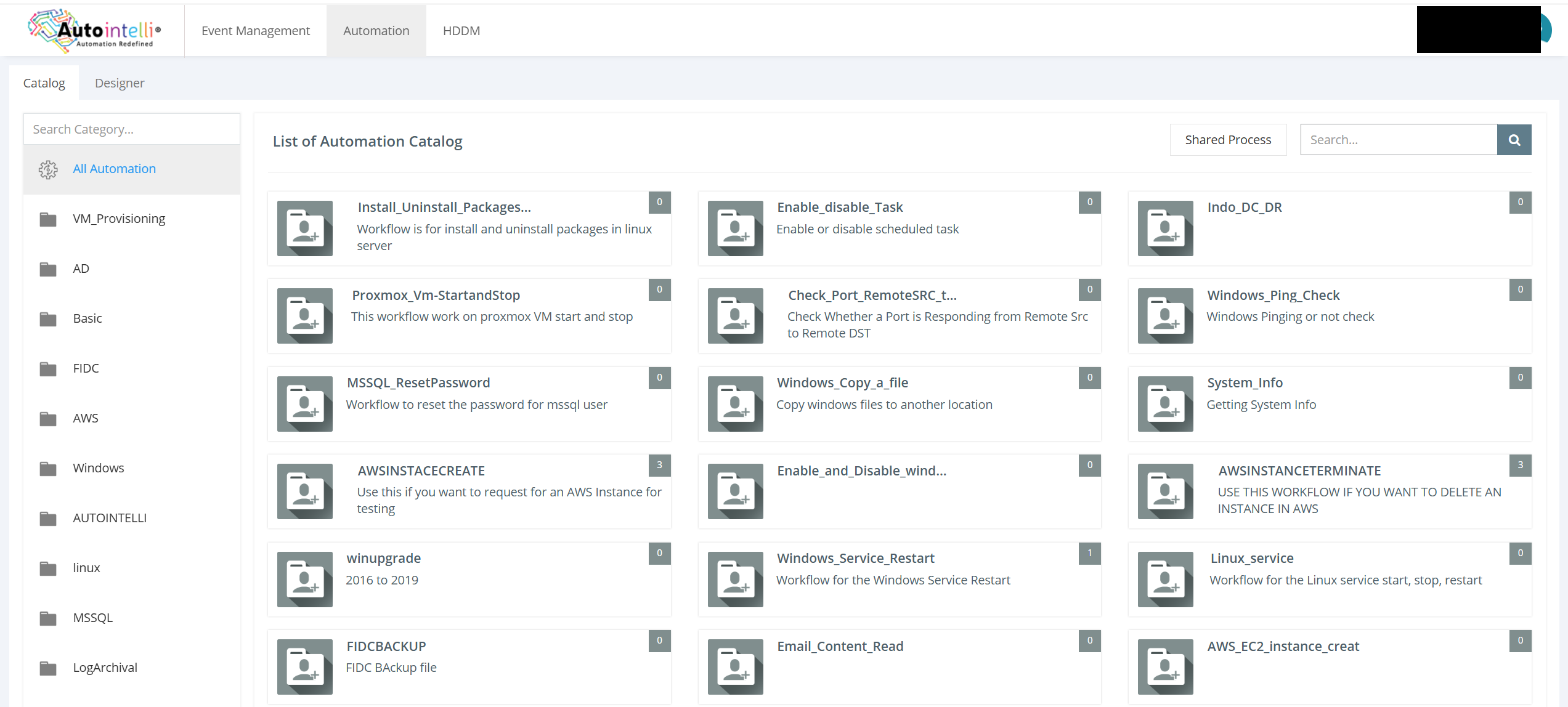
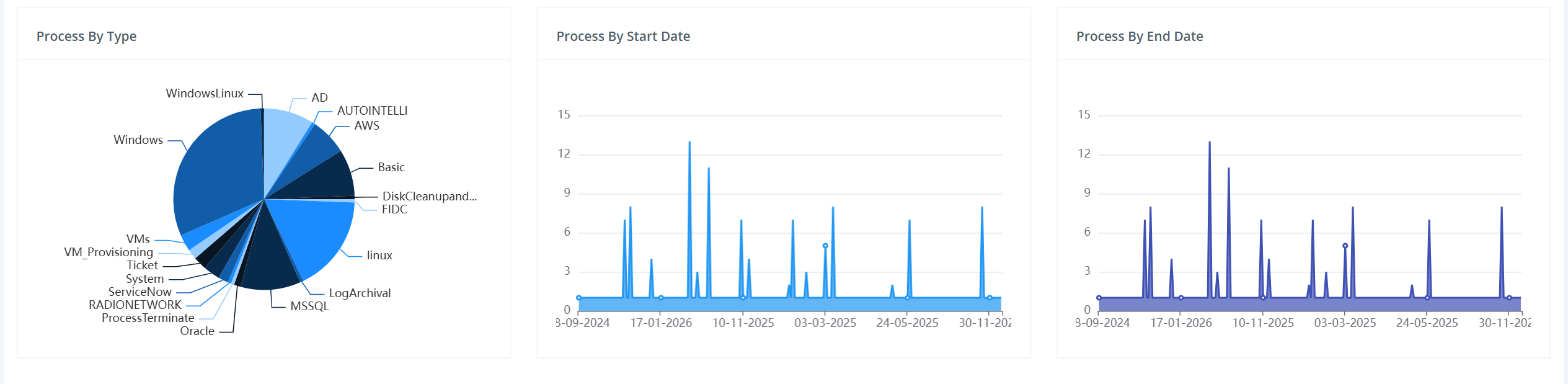
A version-controlled canvas — Script, User, Service and Business Rule tasks, gateways and timer events — wired to your own scripts and deployed with one click.
Catalog and dashboard views show a working demo tenant with illustrative sample data.
Capabilities
Seven pieces of one platform — the script engine, the designer, the repository and the API all work off the same workflow object.
Chain any sequence of IT actions — across servers, network, cloud and applications — into a single automated process, instead of stitching together point scripts by hand.
Build processes from scratch on a BPMN2 canvas, save named versions, and bring your own scripts into one centralized repository.
Write in the language your team already uses. The execution engine runs each script remotely, on the target system, on your schedule.
Run a workflow on a schedule, or let end users trigger it themselves through a self-service portal — no ticket required.
Every deployed workflow is automatically exposed as an API, so triggering it from a third-party system is a breeze.
Extend the same designer into auto-remediation workflows that span multiple systems and steps, integrated with any monitoring tool so recovery starts the moment an alert fires.
An inbuilt credential store handles authentication to every target system seamlessly, so scripts and workflows never hold plaintext secrets.
Teams bring the scripts they already run by hand — package installs, service restarts, password resets, VM provisioning — into a shared, version-controlled repository. The designer turns a sequence of scripts into a repeatable BPMN2 process: gateways for conditional branches, timer events for retries and waits, and a library of Script, User, Service and Business Rule task types to build with.
Demo tenant. Category list and workflow counts are illustrative.
The same workflow engine that runs scheduled maintenance also runs remediation. Wire a workflow to any monitoring tool's alert, and IntelliFlow can restart a service, fail over a link, clear a queue or roll back a change across multiple systems — the same multi-step process it would take an engineer several manual runbooks to complete.
Sample process registry
Real designer canvas. Deploy Process publishes the workflow and its API in one step.
Every run is logged against the workflow that produced it, so recurring operational drills double as audit evidence. BFSI customers run their drills through IntelliFlow and produce the report as per RBI guidelines; insurance customers automate regular compliance activities and produce reports for IRDAI.
Sample dashboard. Illustrative — figures are from a demo tenant, not a customer environment.
Get started
Bring one real runbook to the trial and see it become a scheduled, API-triggerable, auditable workflow.
Tell us where to send access details.
Our team will reach out with your trial instance details shortly.
By submitting, you agree to be contacted about Autointelli. We do not sell your data.