
Unseen
Nobody has a current list of what devices exist, who has them or what is installed.
IT OPERATIONS
Unified360IT operations & observability platformNetwork TopologyAuto-discovered mapsLink UtilizationBandwidth and link qualityBusiness Service ManagementApplications, services and impactIPAMSubnets, IPs and conflictsAlerting & EscalationDetect, notify, recoverSERVICE & ASSETS
ITDeskIT service management platformIncidents & SLAsOne desk for every requestIntelliAssetIT asset & patch managementPatch ManagementDetect, deploy, roll backISMS Audit PackISO 27001 evidence, readyBY CHALLENGE
Blind Spots in InfrastructureNo extra tools: hardware to URLs on one screenSlow Ticket ResolutionRoute, watch and escalate to fix fasterUnknown Assets & Unpatched SystemsKnow what you own, patch what's exposedUncontrolled Privileged AccessVault, approve, record and auditManual, Repetitive OperationsAutomate approvals and remediationAudit & Compliance PressureEvidence on demandBY STACK
Networks & WirelessSwitches, firewalls and controllersServers & DatabasesWindows, Linux and leading databasesVirtual & Hybrid EstatesHypervisors and hybrid workloadsEndpoints & DevicesAgent-based inventory and updatesRemote & Privileged SessionsAgentless SSH, RDP and VNCTools & IntegrationsITSM, SIEM, webhooks and emailLEARN
Quick Start GuidesSoonGet productive with any Autointelli product in minutes.Product DocumentationAdmin manuals, how-tos and API references.Integration CatalogSoonWhat Autointelli connects to, and how.IT Terms ExplainedPlain-language definitions of everyday IT jargon.DISCOVER
Customer StoriesHow organisations get measurable results.WhitepapersResearch on IT operations, ITSM, ITAM and PAM.Ebooks & PlaybooksPractical, step-by-step operating guides.Product DatasheetsCapabilities and technical specifications.Why AutointelliHow we differ from other platforms.Compare AutointelliSide-by-side with tools you may be weighing.Solution · By Stack
Endpoints are the hardest part of the estate to keep straight: they move, they age, and they drift out of date. Autointelli gives you performance monitoring, hardware and software inventory, patching and consent-based remote support for Windows, Linux and macOS devices, from agents you enrol once.
The problem
They leave the building, fall behind on updates and pick up software nobody approved.
Nobody has a current list of what devices exist, who has them or what is installed.
Updates pile up on machines that are rarely on the network, and the register never shows it.
Fixing a remote user's laptop means a long phone call, or a tool that gives no audit trail.
Where it goes wrong
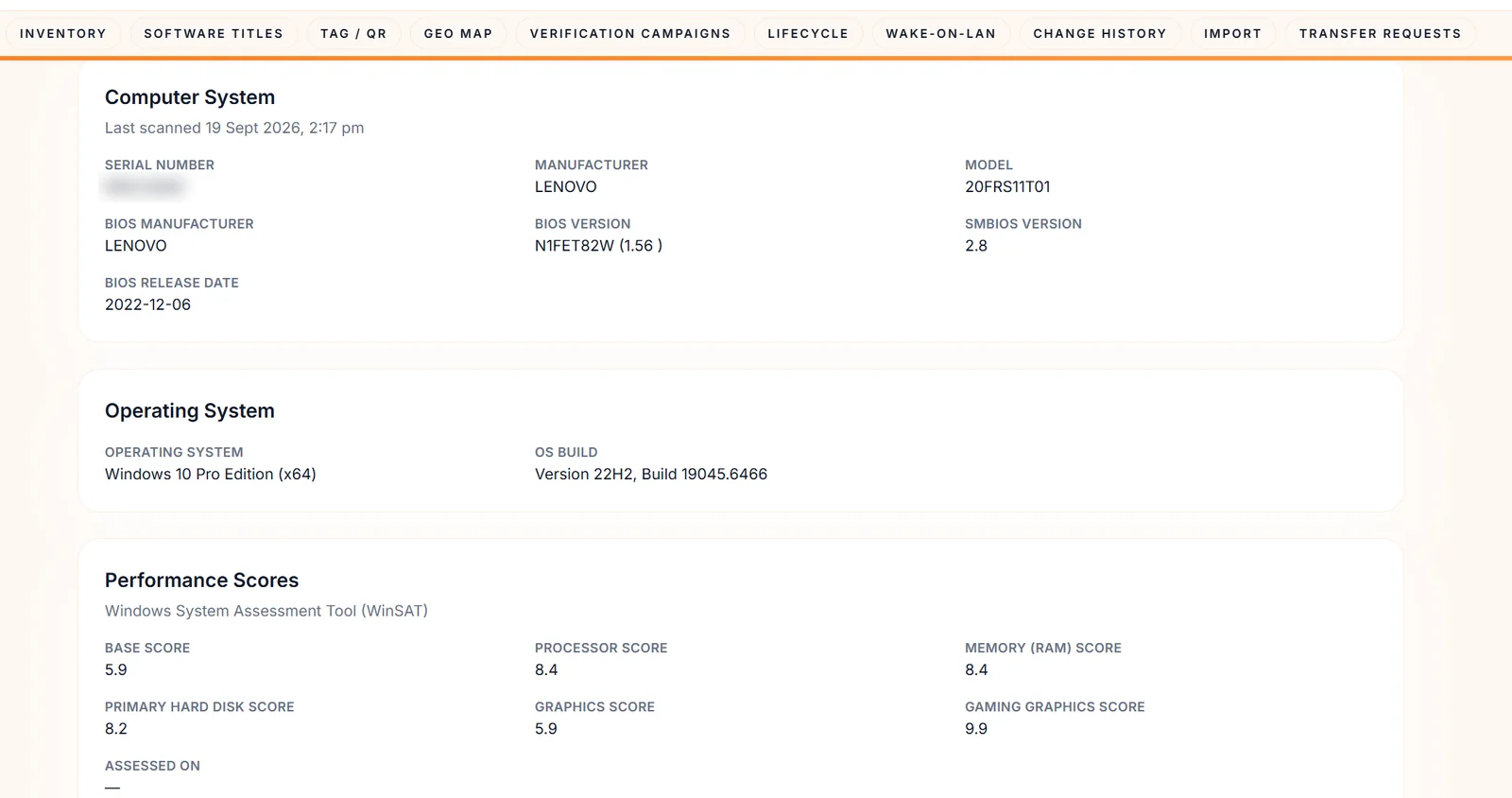
How it goes wrongA laptop's serial, BIOS and disks live in a spreadsheet, if anywhere.
Closed withAgents report serial number, BIOS, operating system, disks, drives and printers, and every change is recorded.
How it goes wrongTitles pile up across the fleet with no view of publishers or licences.
Closed withSoftware inventory per device, publisher concentration, normalisation health and unlicensed titles.
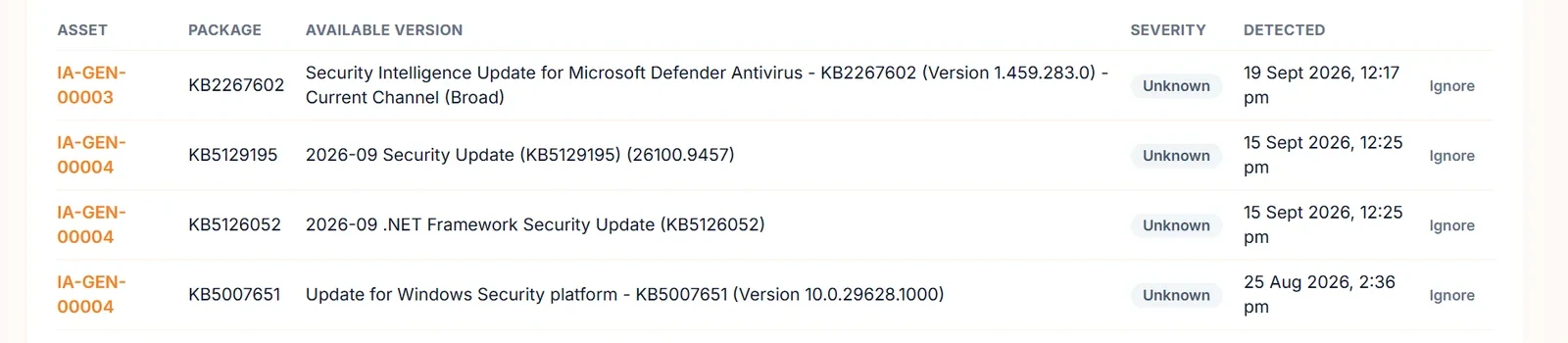
How it goes wrongDevices miss updates for months and nobody sees the total.
Closed withWindows Update and apt scans, patch policies, staged rings with a failure threshold, and a compliance score per device.
How it goes wrongA user says the laptop is slow and there is nothing to look at.
Closed withDesktop monitoring: CPU, memory, disk, network and the top processes, with alerts and a device up/down rule.
How it goes wrongRemote tools that connect silently, or leave no record.
Closed withRemote sessions that ask the user first, let them decline or end the session, and land in a session history.
How it goes wrongA patch window arrives and half the devices are asleep.
Closed withWake-on-LAN powers devices on remotely, and agent coverage shows which devices have stopped reporting.
Four jobs
Pick a job to see what's tracked. Performance comes from Unified360, and the rest from IntelliAsset.
Desktop monitoring through a lightweight agent into Unified360.
Hardware and software collected by the endpoint agent and refreshed on a schedule.
Detect missing updates, roll them out in rings and score each device.
Fix it from anywhere, with the user's consent.
Remote support
Performance and inventory are separate agents today: the desktop monitoring agent reports to Unified360, and the IntelliAsset agent reports inventory and patching.
What changes
Serials, software and owners come from the devices, not from a spreadsheet.
A compliance score per device and staged rollouts that stop when they fail.
Performance history and the top process turn a complaint into something you can check.
Every remote session asks first and is logged.
Questions
The IntelliAsset agent runs on Windows, Linux and macOS for inventory. Patch scanning and installation cover Windows and Debian and Ubuntu Linux.
No. Desktop performance monitoring uses a lightweight agent that reports to Unified360, and inventory, patching and remote support use the IntelliAsset agent.
Yes. The user sees a consent prompt before every session, can decline it and can end the session at any time. Each session is recorded in a history.
Discovery scans IP ranges and subnets, and queries Active Directory, LDAP, SNMP, WMI, PowerShell and SSH targets. Discovered devices go to a review queue, and Windows devices found over WinRM can have the agent pushed to them.
Patch state, agent connectivity, lifecycle and condition, blended into one score with Compliant, At risk and Non-compliant bands.
Yes. Wake-on-LAN can power a device on remotely, and patch policies have maintenance windows and reboot modes.
No. The agents cover Windows, Linux and macOS computers.
See it on your own devices
Tell us how many devices you manage and we'll show you what Autointelli knows about them. No commitment required.