 PRODUCT DATASHEET
IntelliFlow
IT process automation and orchestration
IntelliFlow orchestrates IT automation end to end: a version-controlled BPMN2 designer to build processes from your own scripts, a script engine that runs Python, PowerShell and Bash remotely, and a self-service portal so end users can trigger workflows on demand. Every deployed workflow gets its own API, and a built-in credential store handles authentication to every target system.
Benefits to customer
Stop stitching scripts by handChain any sequence of IT actions into one automated, repeatable process instead of running point scripts one at a time.
Bring your own scriptsPython, PowerShell and Bash scripts your team already has go straight into one shared, version-controlled repository.
Let end users help themselvesA self-service portal lets end users trigger approved workflows on demand, without waiting on a ticket.
Recover without a person in the loopAuto-healing workflows respond to a monitoring alert and fix the problem across multiple systems automatically.
Trigger from anywhereEvery deployed workflow is exposed as an API, so third-party systems can start it directly.
Prove your drills happenedRun history backs BFSI/RBI drill reporting and insurance/IRDAI compliance automation out of the box.
Key capabilities
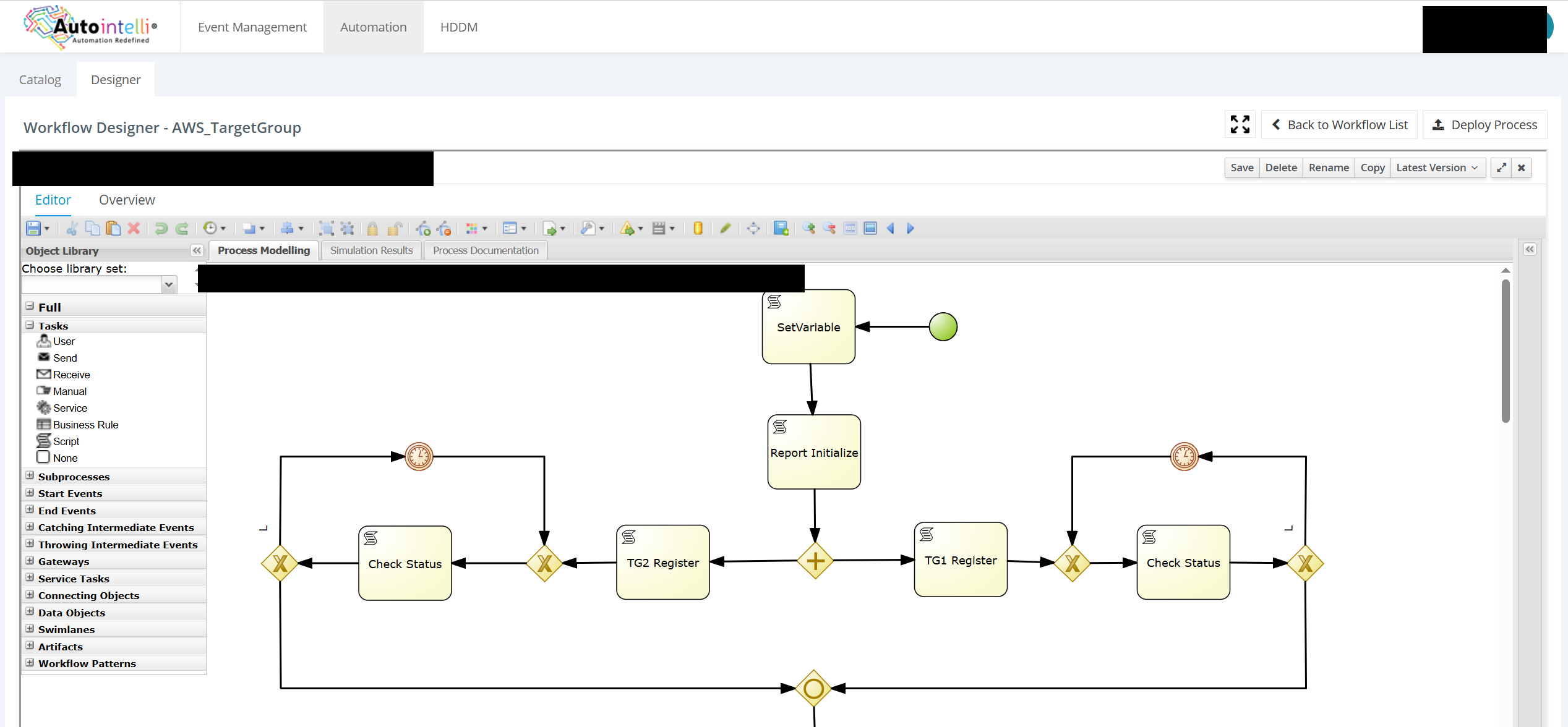
Version-Controlled DesignerBuild processes from scratch on a BPMN2 canvas, save named versions, and bring your own scripts into one centralized repository.
Multi-Language Script EnginePython, PowerShell and Bash scripts run remotely on the target system through a dedicated execution engine.
Scheduled and On-Demand RunsRun a workflow on a schedule, or let end users trigger it themselves through a self-service portal — no ticket required.
An API on Every WorkflowEvery deployed workflow is automatically exposed as an API, so triggering it from a third-party system is straightforward.
Auto-Healing Across SystemsExtend the same designer into auto-remediation workflows that span multiple systems and steps, integrated with any monitoring tool.
Built-In Credential StoreAn inbuilt credential store handles authentication to every target system, so scripts and workflows never hold plaintext secrets.
Process LibraryDeploy started processes for common operations — service restarts, port checks, scheduled task toggles and cloud target-group registration — and extend them with your own.
Compliance-Ready Run HistoryEvery run is logged against the workflow that produced it, so recurring operational drills double as audit evidence.
Remote Execution at ScaleTrigger the same script or workflow across many target systems from one designer, instead of running it by hand on each one.
Gateways, Branches and RetriesConditional branches, timer events for retries and waits, and a library of Script, User, Service and Business Rule task types.
Key differentiators
- A real BPMN2 designer, not a script runnerNamed versions, gateways, timer events and a typed task library, so a change to a live process is never a surprise.
- One engine, three languagesPython, PowerShell and Bash all run through the same remote execution engine, so teams don't need three separate tools.
- Automation and auto-healing in one platformThe same designer that runs scheduled maintenance also runs remediation, wired to any monitoring tool's alerts.
- An API on every workflow, automaticallyNo separate step to expose a workflow as an API — every deployed process gets one.
- Credentials never touch a scriptA built-in credential store injects authentication at run time, so scripts and workflows never hold plaintext secrets.
- Self-hostedRuns on your own infrastructure alongside the rest of the Autointelli platform.
Deployment architecture
Runs as containers on your own infrastructure, alongside the rest of the Autointelli platform.
Deployment, security and integration
Runs on your serversDeployed as containers on your own infrastructure, alongside the rest of the Autointelli platform.
Secure by designRole-based permissions and a built-in credential store keep authentication out of scripts and workflows.
Built to integrateEvery deployed workflow is automatically exposed as an API, and the engine integrates with any monitoring tool to trigger auto-remediation.
Audit-readyEvery run is logged against the workflow that produced it, supporting BFSI/RBI drill reporting and insurance/IRDAI compliance automation.
System requirements
| Operating system | Ubuntu 24.04 LTS, or RHEL 9 / CentOS 9 / Rocky Linux 9 |
|---|---|
| Software | A container runtime. The installer installs it if missing. |
| Script targets | Any Windows, Linux or cloud target reachable over the network |
| Access | A current web browser |
| Larger fleets | Sizing agreed with our team during evaluation |
Licensing model
Commercial terms for IntelliFlow are provided with your quote.
Ask our team for the current licensing model that fits your organisation.
Part of the Autointelli family
Pair IntelliFlow with Unified360, ITDesk, Securita360.
CMMI L3ISO 9001ISO 27001ISO 27034GDPR
Autointelli
Aggregate | Automate | Audit
Aggregate | Automate | Audit
www.autointelli.com
corp@autointelli.com
corp@autointelli.com
484, Anna Salai, Thousand Lights West,
Teynampet, Chennai
Teynampet, Chennai